Docs / MCP
Claude and Claude Code setup
Add Animeblip to Claude as a custom connector, or to Claude Code with one command. Both use the connector URL from the MCP page in the studio sidebar.
Updated November 16, 2026
Before you start
Create a key on the MCP page in the studio sidebar and copy your connector URL. The key is shown once. See Connect an AI app for the full picture.
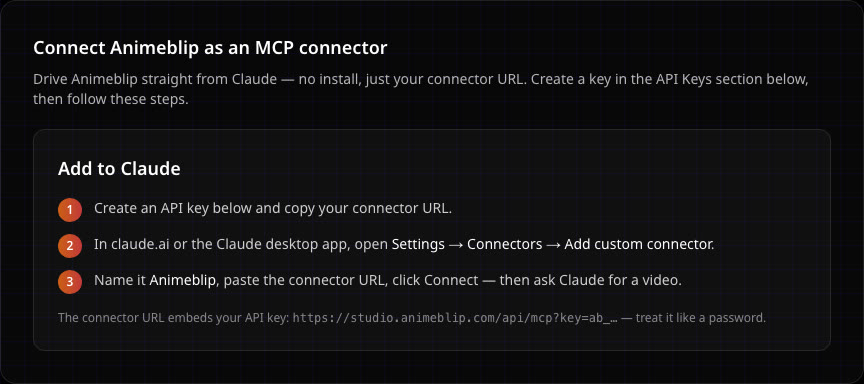
https://studio.animeblip.com/api/mcp?key=ab_...claude.ai
- 1
Open connectors
In claude.ai, go to Settings > Connectors and choose Add custom connector.
- 2
Add Animeblip
Name it Animeblip and paste your connector URL.
- 3
Add it
Choose Add, then Connect if Claude shows it. Animeblip's tools now appear in your Claude chats.
Claude Code
Run this in your terminal, with your own key in place of ab_...:
claude mcp add --transport http animeblip "https://studio.animeblip.com/api/mcp?key=ab_..."Start Claude Code and ask for a video. Claude Code can also run code on your machine, which is what Content factory needs.
Your first request
Ask in plain language, the way you would brief the crew in the studio. Say what the story is, the format and how long it should be.
Weak
Make an anime video.
Better
Use Animeblip to make a 45-second vertical anime short: a street racer in a neon city loses her car the night before the final race and has to win on a borrowed bike. Tense, then triumphant. Send me the final video when it is done.
A clear story, format, length and tone let the agent brief the crew in one go instead of asking you questions.
If something looks wrong
- Claude does not see the Animeblip tools. Check the connector is turned on for the chat, and that the URL includes your full key.
- Claude Code says the server failed. Make sure the URL is in quotes, so your shell does not cut it at the
?. - Your key leaked. Revoke it on the MCP page in the studio sidebar and create a new one. A key has full access to your account and spends your credits.
Next
Was this page helpful?